 Doca
Guide · Windows 10 and 11
How to customize Windows 11
You can make Windows 11 much nicer and tidier without installing ten apps. First, what Windows already lets you do; then, what a dock adds.
Quick answer
Start with Settings: dark mode and accent color, wallpaper, taskbar position and size, and virtual desktops. For the Mac magnifier, always-visible widgets and a dock for each moment, add a dock like Doca.
What you can change in Windows itself
- Dark mode and accent color: Settings › Personalization › Colors.
- Wallpaper and lock screen, including "Windows spotlight", which changes the picture every day.
- The taskbar: alignment (center or left), which icons show, "never combine" and, since the September 2026 update, the position (top and sides) and a smaller bar. See the taskbar on the side.
- Virtual desktops (Win + Tab), one per subject.
What a dock adds
Windows has no magnifier, doesn't put widgets on the bar and doesn't separate apps by time of day. Doca covers all three.
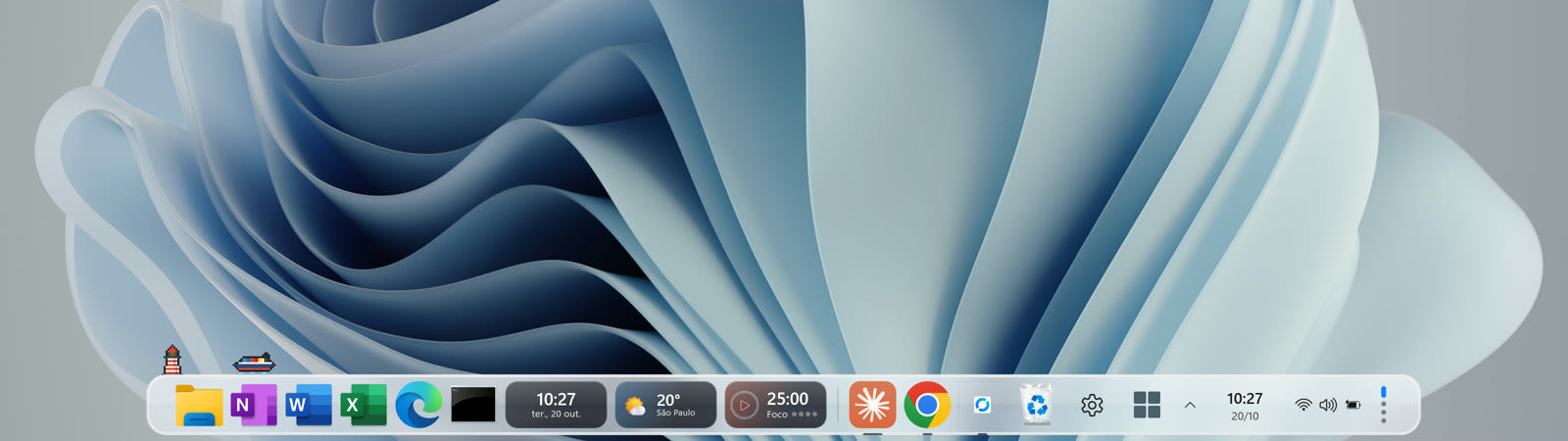
- Environments: one dock for work, another for study, another for leisure. You can tie each environment to a Windows virtual desktop.
- A glass bar with the Mac magnifier, bottom, left or right, on each monitor.
- 40+ widgets inside the dock, in two styles.
- Doca search (Alt + Space, changeable in Settings › Keyboard & shortcuts), with apps, files, math and conversions, and Doca's Start with your pinned apps.
- Top bar and Island, like the Mac menu bar: the environment, the front app, the date, the time and what's going on (music, timers).
Nothing gets left behind: when Doca closes, Windows goes back exactly as it was.
Frequently asked questions
Does customizing Windows slow down the PC?
Changing colors and wallpaper doesn't. Customization apps vary; Doca uses around 40 MB of memory.
Do I need to edit the Registry?
No. Everything here is in Settings or Doca's Settings.
Does Doca work on Windows 10?
Yes, on Windows 10 (version 2004 or newer) and Windows 11.
How much is Doca?
7 days free with everything unlocked. After that, US$ 9 once, no subscription.