 Doca
Complete guide · Windows 10 and 11
How to make Windows look like a Mac
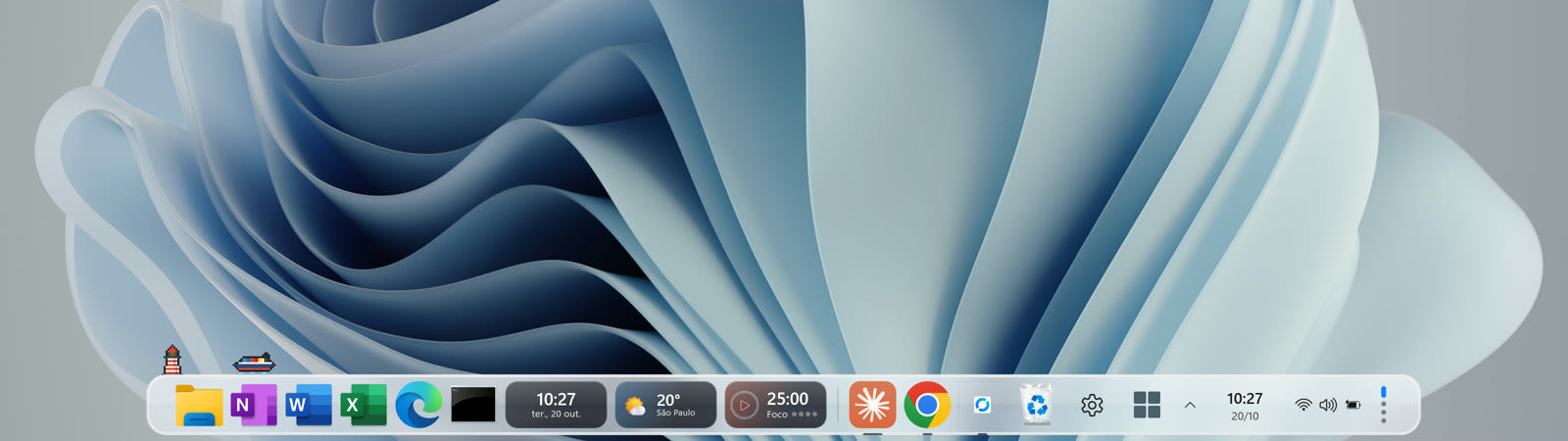
Making Windows look like a Mac isn't about an Apple wallpaper. It's bringing what makes the Mac pleasant: the dock, the top bar, quick search, file previews. This guide shows what Windows already has, what's missing and how to fill the gaps without breaking anything.
Quick answer
For the Mac look and feel on Windows: (1) a dock with the magnifier, like Doca; (2) a menu bar at the top, which Doca also brings; (3) Spotlight-style search (Doca's opens with Alt + Space); (4) Quick Look on the space bar; (5) desktops, which Windows already has. None of it needs Registry edits.
Piece by piece: Mac vs Windows
| On the Mac | On Windows, nothing installed | With Doca |
|---|---|---|
| Dock with magnification | Taskbar, no magnification | Glass dock with the magnifier (adjustable strength and width) |
| Menu bar at the top | The taskbar can move to the top since September 2026, but it's still the taskbar | Top bar with the environment, front app, date and time, and the Island |
| Spotlight (Cmd + Space) | Windows Search (Windows key) | Doca search (Alt + Space): apps, files, math, conversions and the web |
| Quick Look (space bar) | Not built in | Quick preview in the dock's folder stacks |
| Stacks (Downloads on the dock) | Folders pinned in jump lists | Folders as stacks, grid or list; Downloads shows new files |
| Mission Control and Spaces | Task View and virtual desktops (Win + Tab) | Environments: one dock per moment, which can follow your desktops |
| Desktop widgets | Widgets panel that opens on top | 40+ widgets always visible, inside the dock |
1. The dock with the magnifier
It's the piece that changes the system's look the most. A dock sits at the bottom (or on a side) with pinned and running apps, and the icon under the pointer grows and pushes its neighbors. Windows doesn't ship that. See how to get a Mac-style dock and our comparison of docks for Windows.
Doca can sit next to the taskbar, hide it or take its place (with Start, the clock and status icons on the dock). When it closes, the taskbar comes back.
2. The top bar
On the Mac, the menu bar shows the front app, the time and system icons. Doca has a similar top bar, with the environment and front app on the left and the date and time on the right, and the Island in the middle showing what's going on: music playing, a timer, an app asking for attention.
3. Spotlight-style search
Doca's search opens with Alt + Space and finds apps, files, math, conversions and the web, with a file preview. Prefixes filter: ? files only, . apps only, = math only.
4. Desktops and environments
Windows already has virtual desktops (Win + Ctrl + D creates one; Win + Ctrl + arrows switches). Doca adds environments: each with its own apps, widgets and color, and only the windows opened there. You can tie each environment to a desktop. See how to separate work and leisure on Windows.
5. The rest of the look
- Dark mode and accent color in Settings › Personalization › Colors.
- Centered icons are already the Windows 11 default.
- Rounded corners and glass are part of Windows 11; Doca's dock uses the same glass (light or dark, like Windows).
What isn't worth it
"Transformation packs" that replace system files, themes that need tools to bypass Windows signing, and Registry tweaks of unknown origin. They tend to break on the next update. Everything in this guide undoes itself when you uninstall an app.
Frequently asked questions
Can I make Windows look like a Mac without apps?
Partly. Windows 11 already has centered icons, rounded corners, desktops and, since September 2026, a top taskbar. The magnifying dock, widgets on the bar and Spotlight-style search need an app like Doca.
What's the best Mac-style dock for Windows?
It depends on what you want. We compared the main ones (Doca, Winstep Nexus, MyDockFinder, Seelen UI) on the best docks for Windows page, with what each does best.
Will it slow down my PC?
Doca uses around 40 MB of memory and sits nearly idle when you're not using it.
Does everything go back to normal if I give up?
Yes. When Doca closes, even if it crashes, a watchdog process restores the taskbar and every window. To remove it, just uninstall it.
How much is it?
7 days free with everything unlocked. After that, US$ 9 once, no subscription.