 Doca
Guide · Windows 10 and 11
A Mac-style dock on Windows
The Mac dock is that glass bar with your apps that grows under the pointer. Windows doesn't ship anything like it, but you can have a dock like that, with things the Mac doesn't have.
Quick answer
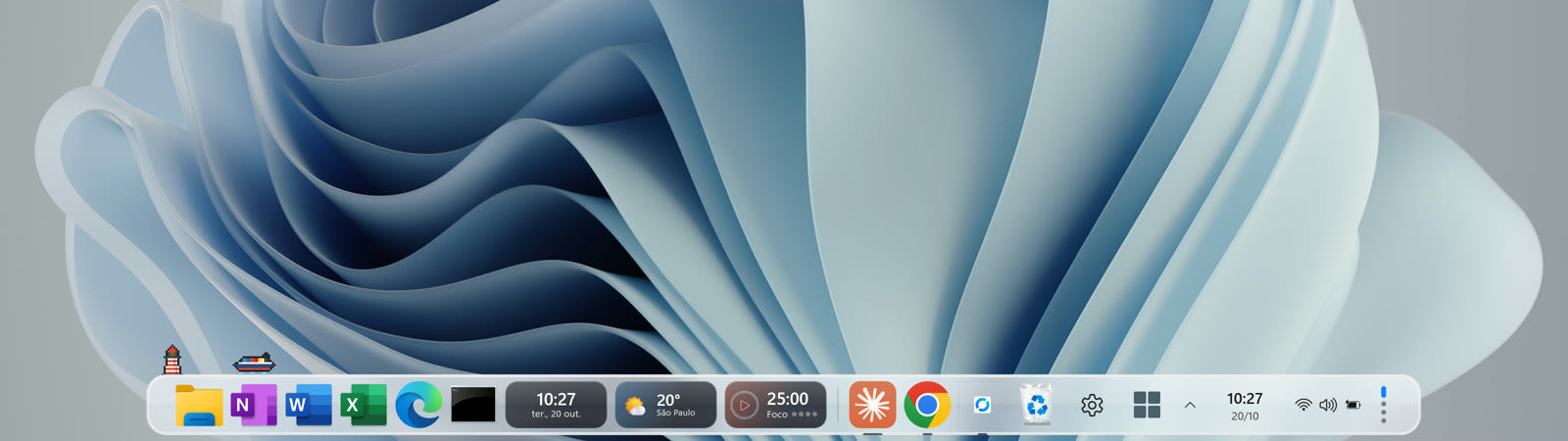
Install a dock. Doca is a dock for Windows 10 and 11 with a glass bar, the magnifier (the icon grows and pushes its neighbors), pinned apps and folders, and widgets inside the dock. It sits next to the taskbar or replaces it.
What a Mac-style dock needs
- The magnifier: the icon under the pointer grows from its base. In Doca you choose the strength, the lens width or a subtler effect.
- Pinned and running apps in one place, with a dot under the open ones and live window previews when you hover.
- Folders as stacks: Downloads and Documents open as a grid or list, with Quick Look on the space bar.
- Your position and size: bottom, left or right, with auto-hide, on any monitor.
What Doca does that the Mac dock doesn't
- Environments: one dock for each moment (Work, Study, Leisure), each with its own apps, widgets and color. Switch with the mouse wheel over the dock or with a shortcut.
- Live widgets inside the dock: clock, weather, Pomodoro, stock quotes, Steam, your PC's CPU and 40+ more, in two styles (Glass and Vivid colors).
- It can replace the taskbar, with Start, the clock and status icons on the dock itself.
Want to go beyond the dock? The guide how to make Windows look like a Mac covers it piece by piece.
Frequently asked questions
Is there an official Mac dock for Windows?
No. Windows uses the taskbar; a dock is a separate app, like Doca.
Does Doca slow down my PC?
It's light: around 40 MB of memory, and it sits nearly idle when you're not using it.
Do I need an account?
No. No account, no ads. The trial is 7 days with everything unlocked and no card.
What if I don't like it?
Just uninstall it. When Doca closes, Windows goes back exactly as it was.