 Doca
Windows 11 · Taskbar
How to hide the taskbar in Windows 11
More screen space, fewer distractions. Windows 11 can auto-hide the taskbar; what it can't do is make it go away for good.
Quick answer
Go to Settings › Personalization › Taskbar › Taskbar behaviors and turn on Automatically hide the taskbar. It comes back when the pointer touches the edge. If you want the taskbar gone for good, with your apps on a dock that also hides, Doca can take its place and restore it when it closes.
Step by step in Windows
- Right-click an empty spot on the taskbar and choose Taskbar settings.
- Open Taskbar behaviors.
- Check Automatically hide the taskbar.
Note: if you moved the taskbar to the top or a side (new in September 2026), Microsoft says auto-hide isn't supported in those positions yet.
Why the taskbar won't hide
- An app asking for attention (the icon flashing orange) keeps the taskbar open. Open the app and it hides again.
- Notifications and tray icons sometimes do the same. Restarting Windows Explorer (Task Manager › Windows Explorer › Restart) usually fixes it.
- Touch: in tablet posture, the taskbar behaves differently.
Hide the taskbar for good, with Doca
Auto-hide still makes the taskbar pop up every time the pointer reaches the bottom. With Doca you choose what to do with it in Settings › Screen & Windows › Windows taskbar: "Leave as is", "Auto-hide taskbar" or "Doca only". With "Doca only", Start, the clock, status icons and the tray (behind the arrow) move to the dock, which can auto-hide too (Automatically hide the dock, on the same page), at the bottom or on the sides.
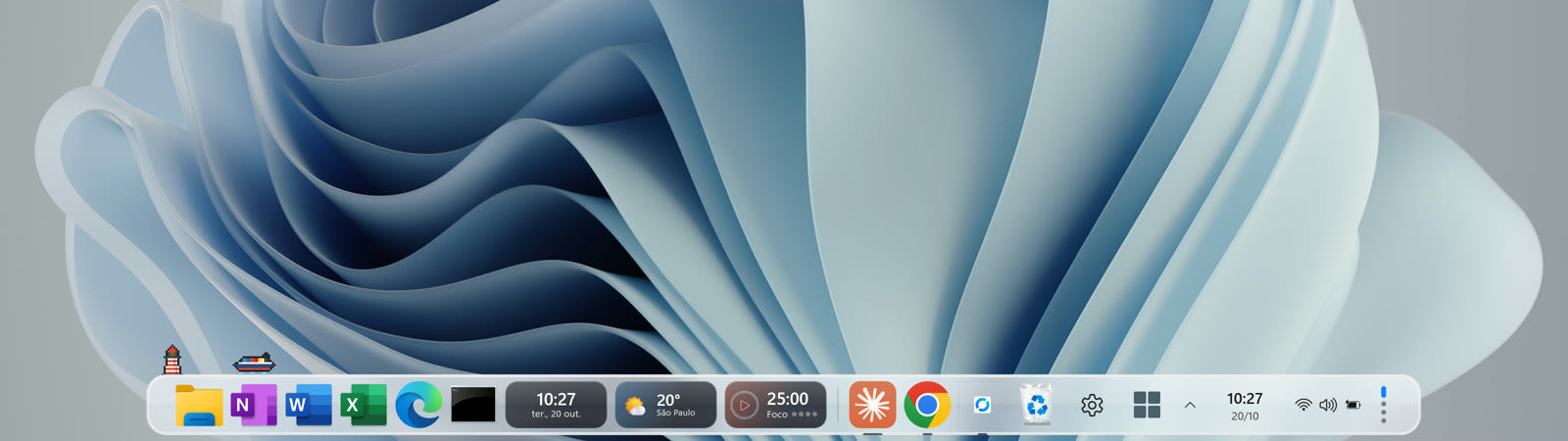
If Doca closes, even if it crashes, a watchdog process brings the Windows taskbar right back.
Frequently asked questions
How do I hide the taskbar in Windows 11?
Settings › Personalization › Taskbar › Taskbar behaviors › Automatically hide the taskbar.
Why won't my taskbar hide?
Usually an app asking for attention or a tray icon keeps it open. Open the flashing app or restart Windows Explorer from Task Manager.
Can I auto-hide a side taskbar?
Not with the native taskbar yet: in the top and side positions, auto-hide isn't supported. Doca's dock auto-hides at the bottom and on the sides.
Does the taskbar come back if I close Doca?
Yes. When Doca closes, even if it crashes, a watchdog process restores the taskbar and every window. To remove it, just uninstall it.